
Resources · Google Business Profile
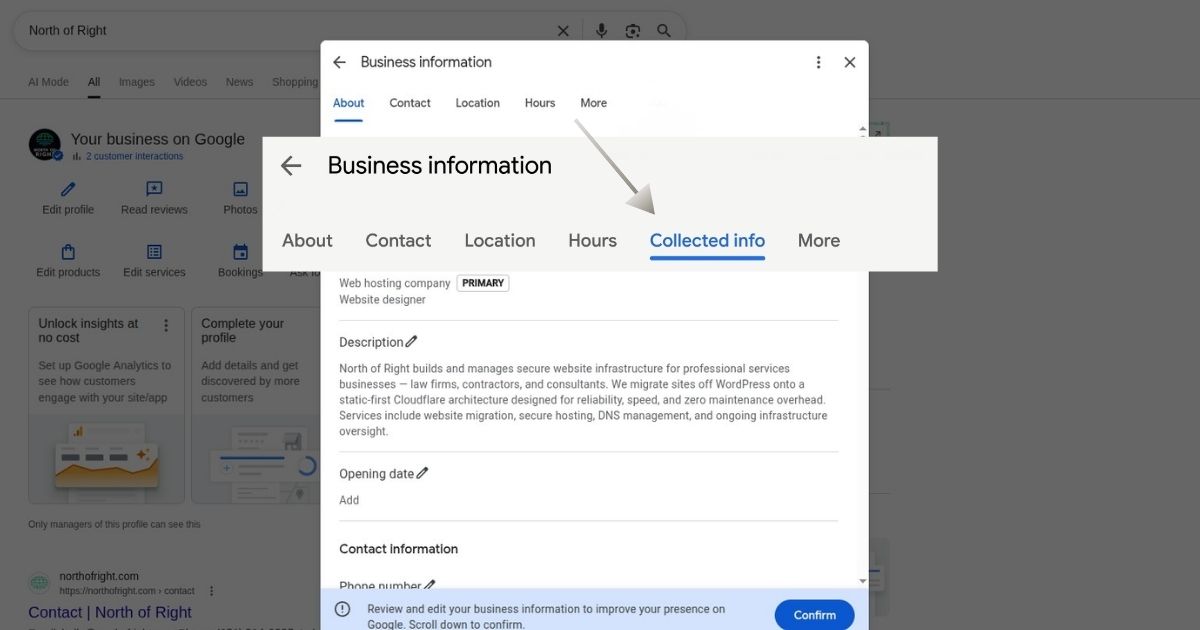
Google's New Collected Info Tab for Business Profiles, Translated
By Seth Aho · July 30, 2026 · 3 min read
The short version
Google’s automated system can contact your verified business by phone, text or WhatsApp to confirm details like curbside pickup, parking and walk-in availability. Anything your business says in response can be used to update your public Business Profile. A new Collected info tab shows what Google gathered and lets you delete individual items. Rollout is gradual. I don’t see the tab on my own profile yet.
What Google is saying
Everything in this section comes from two of Google’s own help pages: the Business Profile editing documentation and the automated calls and texts documentation. Go direct. You can check every claim below against them.
Google contacts the phone number listed on a verified Business Profile to confirm that public details are accurate. The contact can come as an automated call, a text or a WhatsApp message. Anything your business provides in response can be used to update the profile. That part already happens today.
The tab works like this. Go to your Business Profile, select Edit profile, then Collected info. Each collected item appears with its source and the date Google gathered it. A Delete option sits next to each item.
Google notes one limit. Deleting collected information removes it from Google’s records. It does not change details already live on your Business Profile. Those fields need a direct edit.
Google lists the feature as available for select regions, languages and business categories. Not everyone has it. I checked my own profile and the tab isn’t live for me yet. If it’s showing on yours, I’d like to hear about it.
What it means in practice
Your Business Profile can change because of a phone call your front desk answered without knowing who was asking. Now you can trace it. The source and date on each item tell you which call or message produced the change.
Wrong detail already live? Cleanup takes two steps. Delete the bad item in Collected info to clear Google’s records. Then edit the affected field so the public listing shows the right information. One step without the other leaves the error in front of your customers.
Tell your front desk. Google makes these calls, and whatever the person answering says can end up on your public listing.
What to check today
Open your Business Profile and select Edit profile. Look for Collected info. Read every item against what’s true at your business. Delete anything wrong, then check whether the same detail sits live on your public profile and correct that field directly. No tab? The rollout hasn’t reached you, so check back.
Closing
Businesses have watched their profiles change with no explanation for years. This tab is progress. Read yours as soon as it appears.
Questions about what this means for your listing? Reach out through my contact page. If your profile already shows wrong information you can’t trace, my website fix diagnostic covers exactly that.
Share this article